
Confirm your age
Please verify that you are 18 years of age or older to enter this site.



Last Updated: September 15, 2026
The best platform for a virtual cocktail party is the one your guests already know how to use. Fancy features mean nothing if half the group spends twenty minutes fiddling with settings while the ice melts.
Zoom, Google Meet, and Microsoft Teams all handle the basics well. For smaller gatherings, a simple group video call can work just as nicely. What matters is stability, decent audio, and a layout that lets everyone see each other.
A few practical points:
Keep screen sharing simple. If you're demonstrating a cocktail build, position your camera so your hands and glass are both visible. Good lighting beats a high-end webcam every time.
A virtual cocktail party works best with eight to twelve guests. Fewer than six and conversation can stall; more than fifteen and quieter guests get lost in the grid.
Start with your invitation. A clear virtual cocktail party invitation template should include the date and time, the platform link, any theme or dress code, and what guests need to bring or prepare.
Here's a simple template you can copy:
You're invited to a Virtual Cocktail Party Date: [date] | Time: [time] Where: [platform link] Theme: [theme] | Dress code: [optional] Bring: One drink of your choice (or your cocktail kit if you've ordered one) We'll kick off with a quick toast at [time], then games and chat. See you there.
Send invitations at least a week ahead, with a reminder the day before. A short, warm message lands better than a formal one.
Sending cocktail kits to guests is the single easiest way to make a virtual party feel like a real one. Everyone opens the same box, pours the same drink, and suddenly you're all in the same bar, just in different rooms.
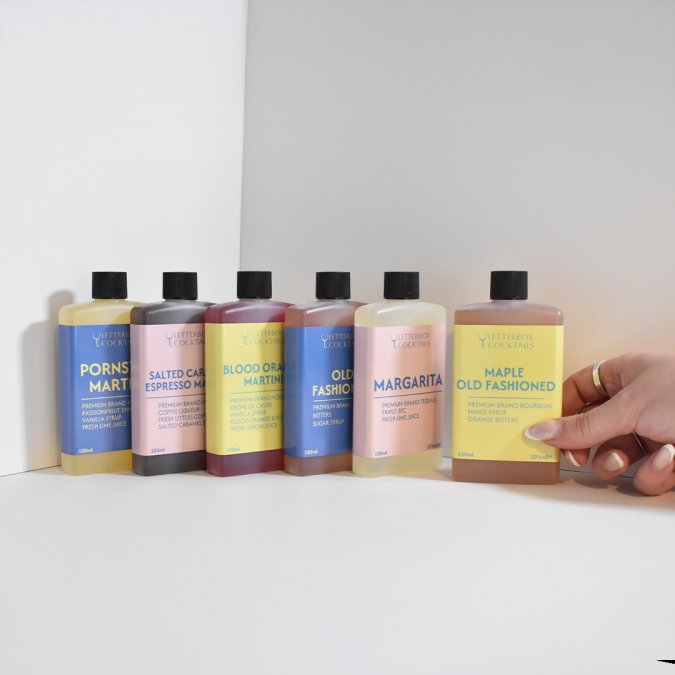
The practical side matters. Letterbox-friendly packaging means kits arrive through the front door without anyone needing to be home. At Letterbox Cocktails, we deliver ready-to-drink cocktails straight through the letterbox, so there's no missed delivery and nothing to refrigerate at the last minute.
When sending kits:
If you're hosting a larger gathering, a party pack covers the group without a scramble. [The Go Bigger Party Pack gives you twelve full-size cocktails across four flavours](/products/go-bigger-12-pack), which suits most mid-sized parties nicely. If you'd rather let guests pick their own drinks, our Build Your Own Boxes are an easy way to mix and match.

A theme gives people something to lean into and makes photos far more fun. It doesn't need to be elaborate. A simple prompt like "1920s speakeasy," "tropical holiday," or "black tie from the waist up" is enough.
Dress codes work best when they're optional but encouraged. Nobody wants to feel underdressed in their own kitchen, so keep it light. Suggest a colour, a hat, or a single accessory rather than a full costume.
Pair the theme with a signature drink. If the theme is Italian, a margarita won't quite fit, but a citrus-forward cocktail will. Let the theme guide the drink, not the other way around.
Virtual cocktail party games and activities are what separate a lively hour from an awkward one. The goal is simple: give people something to do together, not just something to watch. Most guides stop at a short list. The trick is matching the game to the size of your group and the point in the evening.
Use these while people are still arriving and settling in. They work because nobody has to be clever or quick.
Once people are talking, move to something with a bit more structure.
When you have more than twelve guests, the grid gets busy and it's easy for people to go quiet. These formats keep everyone involved without putting anyone on the spot.
Good atmosphere comes down to three things: light, sound, and a tidy background. Sit facing a window or a lamp rather than with your back to one. Use headphones if your room echoes.
Snacks should be easy to eat one-handed. Think olives, nuts, crisps, or small bites that don't need a plate and fork. If your theme has a cuisine, lean into it. A margarita pairs beautifully with salty snacks, which is why our Margarita tends to disappear fast at these events.
On screen setup:
Inclusivity and budget are the two things most hosting guides skip, and they matter more than any theme. A party that only works for people who drink alcohol, have fast internet, and can afford a full bar setup isn't really a party for everyone.
Accessibility isn't a box to tick. It's what lets every guest actually take part.
Start by picking a video platform everyone can use, like Zoom or Google Meet. Send invitations at least two weeks ahead with a clear theme and drink suggestions. Keep the guest list to 8 to 12 people so everyone gets time to talk. Plan one or two simple games to break the ice, and share a cocktail recipe or kit in advance so nobody feels left out.
Sending kits makes the event feel more special and ensures everyone has the same drink in hand. Letterbox Cocktails delivers ready-to-drink options through the post, so guests can join without shopping or mixing. For a group, a party pack can cover everyone. Post kits with enough time for them to arrive before the event.
Plan a mix of structured and free-flowing moments. Use icebreakers like 'two truths and a lie' or a quick cocktail trivia round. Ask guests to share a photo of their setup or their favourite glass. Rotate who speaks so quieter guests get airtime. Keep the event to a comfortable length, as energy can drop on video calls.
Try a 1920s speakeasy night with jazz playlists and vintage glasses, a tropical tiki evening with paper umbrellas, or a 'bring your own signature drink' challenge where each guest invents a cocktail. Seasonal themes work well too, like a summer garden party or a winter warming drinks night with mulled options and cosy lighting.


£19.95 GBP
Unit price per